http://ken1hg.sakura.ne.jp/arupro/pc/48.html
Too deep. Because not only "Users" but "Program" directories are moved , so this is just for reference.
http://yakushima-tonbo.com/windows/Windows7_tips_files/index.htm
Tips site, useful.
http://taiseiko.blog.so-net.ne.jp/2009-11-01
doesn't work according to the procedure.
Showing posts with label IT. Show all posts
Showing posts with label IT. Show all posts
November 23, 2011


September 17, 2011
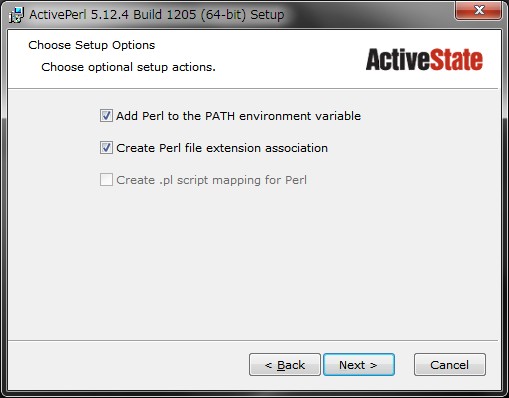
ActivePerl
http://www.activestate.com/activeperl/downloads


う~ん。エラーで終わってしまった。Apacheが起動しない。
参照元: http://phpjavascriptroom.com/?t=php&p=cgi




う~ん。エラーで終わってしまった。Apacheが起動しない。
参照元: http://phpjavascriptroom.com/?t=php&p=cgi




Chrome 14 released, then updated
Updated Google Chrome 14 is released on 16 Sept.
Then I updated it. The Screenshot is below. The changing points are not identified at this moment.


Then I updated it. The Screenshot is below. The changing points are not identified at this moment.

September 10, 2011
Virus "System Recovery" ...
I got email from my friend, no title just only link.
as shown below...

(some variation exists after last slash"/")
But do not click the link. Otherwise your computer would be infected by the Virus, "System Recovery.

To remove it, refer to the link..
LINK1 Brief procedure to remove System Recovery Virus
LINK2 Code to activate full-version of "System Recovery"
LINK3 To remove Trojan horse...
Today Trend Micro Virus-Baster (Corp10.5 and pattern 8.415.80) cannot find this as Virus.
I did the following.
1. Activate the full version of this Virus program using code in LINK2 according to LINK1.
2. Then wait till recovery. (though I wanna pause the program)
3. After activate the program, you cannot use taskmgr, view Rougue Killer web-site, or run some useful programs... I cannot stop(Quit) the Virus as shown in LINK1, so I restart the computer. (before that, you should run "msconfig" not to start-up the Virus. The name ... I forget but easy to find because of suspicious name)
4. you can find quick start task bar the shortcut. and task menu (the virus running).
5. You can quit the program even if the program is running.
6. and run msconfig to unactivate it from start-up.
7. run Microsoft safety(downloaded, ~70MB) scanner to remove the Virus. (one detected and removed)
8. Just in case, To remove TDSS Trojan house, run TDSSkiller. (One detected and removed)
9. might run Registry recovery program but I didn't today.
Can you make it?
as shown below...
(some variation exists after last slash"/")
But do not click the link. Otherwise your computer would be infected by the Virus, "System Recovery.

To remove it, refer to the link..
LINK1 Brief procedure to remove System Recovery Virus
LINK2 Code to activate full-version of "System Recovery"
LINK3 To remove Trojan horse...
Today Trend Micro Virus-Baster (Corp10.5 and pattern 8.415.80) cannot find this as Virus.
I did the following.
1. Activate the full version of this Virus program using code in LINK2 according to LINK1.
2. Then wait till recovery. (though I wanna pause the program)
3. After activate the program, you cannot use taskmgr, view Rougue Killer web-site, or run some useful programs... I cannot stop(Quit) the Virus as shown in LINK1, so I restart the computer. (before that, you should run "msconfig" not to start-up the Virus. The name ... I forget but easy to find because of suspicious name)
4. you can find quick start task bar the shortcut. and task menu (the virus running).
5. You can quit the program even if the program is running.
6. and run msconfig to unactivate it from start-up.
7. run Microsoft safety(downloaded, ~70MB) scanner to remove the Virus. (one detected and removed)
8. Just in case, To remove TDSS Trojan house, run TDSSkiller. (One detected and removed)
9. might run Registry recovery program but I didn't today.
Can you make it?
August 25, 2011
FireFox4
最新は6?ですが、

今は、Chromeを使っています。IE9の方が検索窓の予測効果が高い。
Chromeはソースコードやソース画像を表示させるのが得意ですね。
August 03, 2011


July 18, 2011
WindowsのWindowを移動する方法(マウスなし)。
0) [Alt]+[Tab]にて希望のウィンドウに切り替える。
1)[Alt]キーを押しながら[スペース]キーを押す。
2)メニューが表示されたら[移動]を選択する。
3)矢印キーでウィンドウを移動する。
4)[Enter]キーを押すと移動が完了する。
引用元:http://allabout.co.jp/gm/gc/81124/
1)[Alt]キーを押しながら[スペース]キーを押す。
2)メニューが表示されたら[移動]を選択する。
3)矢印キーでウィンドウを移動する。
4)[Enter]キーを押すと移動が完了する。
引用元:http://allabout.co.jp/gm/gc/81124/
July 12, 2011
7 July My Own Virus Baster inactivated...
Security Shield 2011版の駆除をすることになった。友人のご自宅PC。
なんでも友人のメールがURLのみの記載で、これをクリックしたら・・・症状発生↓。
事前情報で、緑の盾のアイコンに、ボタンを押すとクレジットカード番号と数十ドルの入金依頼画面になると。
また画面が震えているという状況。
事前に、対策サイトを見つけたので、記載。これは2011年1月版。
http://geocities.yahoo.co.jp/gl/gbmogiki/view/20110118/1295309272

http://siri-urz.blogspot.com/2010/12/security-shield-is-new-version-of.html
64C665BE-4DE7-423B-A6B6-BC0172B25DF2
、
なんでも友人のメールがURLのみの記載で、これをクリックしたら・・・症状発生↓。
事前情報で、緑の盾のアイコンに、ボタンを押すとクレジットカード番号と数十ドルの入金依頼画面になると。
また画面が震えているという状況。
事前に、対策サイトを見つけたので、記載。これは2011年1月版。
http://geocities.yahoo.co.jp/gl/gbmogiki/view/20110118/1295309272
http://siri-urz.blogspot.com/2010/12/security-shield-is-new-version-of.html
64C665BE-4DE7-423B-A6B6-BC0172B25DF2
、
緑の盾・・・はこちら↓2011年6月版。7月1日ごろらしいのでなかなかホットな方です。

引用元:http://geocities.yahoo.co.jp/gl/gbmogiki/view/20110611/1307935047
この人の説明では、こんな4つの手順だそう。
オンサイトでのリスク回避のため、Rogue Killerと、Microsoft Safety Scannerと このページのhtmlデータとテキストデータ。Chromeのsetup.exeをUSB flash Memoryに入れて持参した。
現場で・・・・(続く)
引用元:http://geocities.yahoo.co.jp/gl/gbmogiki/view/20110611/1307935047
この人の説明では、こんな4つの手順だそう。
◆ Security Shield (Security Shield 2011) の駆除削除方法 【無料】 これは従来の「Security Shield」からデザインだけ変わっただけなので、駆除削除の流れは同じです。
※Security Shield Pro のパス - Vista/7 → C:\Users\ユーザー名\AppData\Local\Security Shield Pro - XP → C:\Documents and Settings\ユーザー名\Application Data\Security Shield Pro |
オンサイトでのリスク回避のため、Rogue Killerと、Microsoft Safety Scannerと このページのhtmlデータとテキストデータ。Chromeのsetup.exeをUSB flash Memoryに入れて持参した。
- 友人のご自宅で、Internetにつながっていないいと孤立してしまう。
- 会社のノートPCが使えるらしいが、万全でないことを想定。
- データの移動とかに便利かな、、くらい。
現場で・・・・(続く)
June 17, 2011
FreeBSD DVD burn
一昨日 FreeBSDのインストーラーDVDを作った。
サイトから、DVDイメージ(.iso)の圧縮ファイル「FreeBSD-8.2-RELEASE-amd64-dvd1.iso.xz」をダウンロード(2GB 20分近くかかった・・・)し、・・・
解凍できるファイル対象が多いlhaplusで解凍しようとしたら、拡張子が、xzでNGだったので、7-zipという解凍ソフトをダウンロードし、解凍。
その後、DVDに焼いた。Roxio Burnというソフトが簡単に「ワン右クリック」でやってくれた。たすかる~。
次の日(昨日)に、 そのままにしておいたのを忘れていたら、DVD優先起動にしてあったのを忘れて、FreeBSD起動画面が現れた・・・。あれれ。
今度は、USB-FLASHにインストールして起動用USBを作る。
USBメモリはAMAZONで700円程度でゲットしてあるのであった。
サイトから、DVDイメージ(.iso)の圧縮ファイル「FreeBSD-8.2-RELEASE-amd64-dvd1.iso.xz」をダウンロード(2GB 20分近くかかった・・・)し、・・・
解凍できるファイル対象が多いlhaplusで解凍しようとしたら、拡張子が、xzでNGだったので、7-zipという解凍ソフトをダウンロードし、解凍。
その後、DVDに焼いた。Roxio Burnというソフトが簡単に「ワン右クリック」でやってくれた。たすかる~。
次の日(昨日)に、 そのままにしておいたのを忘れていたら、DVD優先起動にしてあったのを忘れて、FreeBSD起動画面が現れた・・・。あれれ。
今度は、USB-FLASHにインストールして起動用USBを作る。
USBメモリはAMAZONで700円程度でゲットしてあるのであった。
May 25, 2011
Sleep shortcut setting for Windows 7
To save power consumption, I made it on desktop to enable to sleep the computer briefly.


May 10, 2011
「日本マイクロソフトがPC節電プログラム配布」って
http://www.nikkei.com/news/headline/article/g=96958A9C93819696E3E2E299938DE3E2E2E7E0E2E3E38698E2E2E2E2;n_cid=DSGGL001
パソコン3割節電 日本マイクロソフトがプログラム配布
だそうで。いいことです。
Subscribe to:
Posts (Atom)